

Can a Bitly alternative use custom branding?
Short links have become an important part of digital marketing, social media, email campaigns, advertising, and business communication. A well-designed short URL is easier to remember, easier to share, and often looks more professional than a long web address filled with tracking parameters. 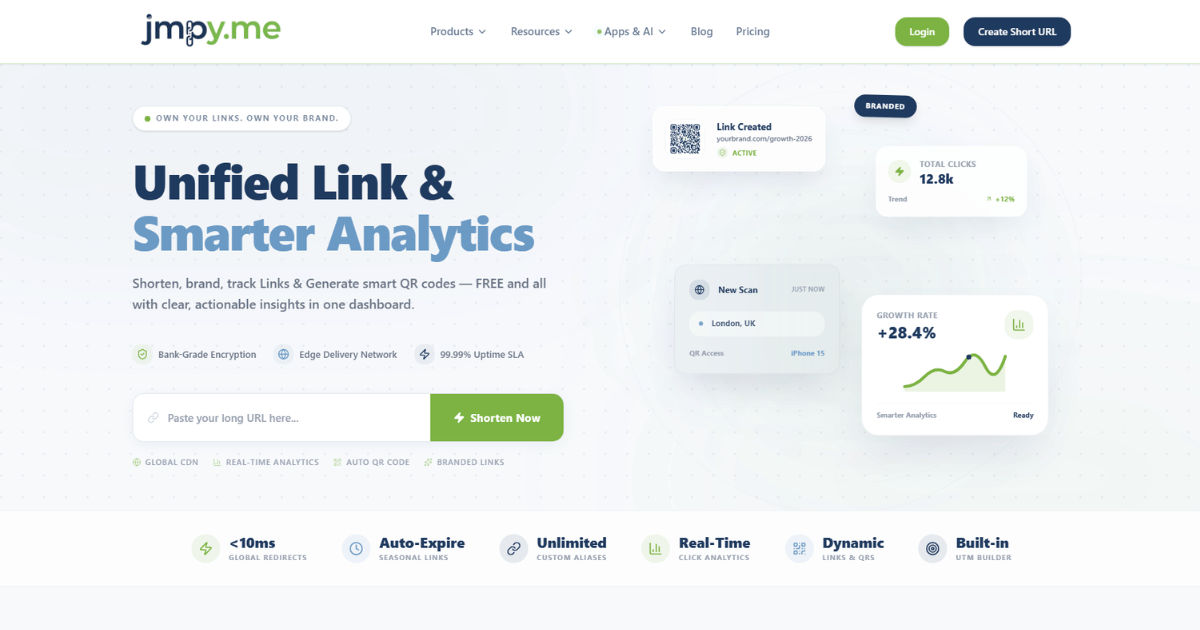
A Bitly alternative can absolutely support custom branding, and many modern URL-shortening platforms offer branding features that go beyond simply creating shorter links. Depending on the service, businesses may be able to use their own branded domain, create custom short URLs, customize the back-half of links, track campaign performance, and manage branded links from a central dashboard.
For example, instead of sharing a generic shortened URL that uses a third-party domain, a company might use a branded domain that matches its business identity. The result can be a link that feels more trustworthy and recognizable to the audience.
Custom branding is especially useful for companies that rely heavily on digital campaigns. Marketing teams, agencies, publishers, ecommerce businesses, nonprofits, and creators can all benefit from branded short links. However, not every URL-shortening service offers the same level of customization.
This comprehensive guide explains how custom branding works, what features to look for, how branded domains are connected, what benefits businesses can expect, and what limitations should be considered before choosing a URL-shortening platform.
What Is Custom Branding in URL Shortening?
Custom branding means using your own business identity within shortened URLs rather than relying entirely on the default domain provided by a URL-shortening service.
A typical short link may contain two main parts:
- The domain used for the short URL
- The customized ending or slug
For instance, a business might have a domain that represents its brand and use it specifically for marketing links. The shortened URL can then become part of the company's overall communication strategy.
This approach makes the link more recognizable before someone even clicks it.
Custom branding can include several different features. The most common is a custom branded domain. Some platforms also allow businesses to create memorable keywords after the domain, customize QR codes, add brand logos, and use consistent naming conventions across campaigns.
The exact features depend on the platform.
Some services focus mainly on basic URL shortening, while others provide complete branded link management systems. Therefore, when evaluating a Bitly alternative, it is important to understand exactly what "custom branding" means within that particular service.
How Does a Branded Short Link Work?
A branded short link works through a combination of a custom domain and URL redirection.
Imagine that a business owns a domain specifically for marketing purposes. Instead of sending users directly to a long destination URL, the business creates a short link using its branded domain.
When someone clicks the link, the URL-shortening platform receives the request and redirects the visitor to the original destination.
The process usually happens very quickly.
From the user's perspective, the experience is simple. They click the short URL, and the browser opens the intended webpage. Behind the scenes, the shortening platform records relevant information, such as the click, device type, approximate location, referral source, or campaign information, depending on the tracking settings and privacy policies.
The custom domain is what makes the link visibly connected to the business.
This is different from simply customizing the final part of a generic short URL. A branded domain gives the business more control over how the link appears.
Can a Bitly Alternative Use a Custom Domain?
Yes. Many URL-shortening platforms allow businesses to connect a custom domain for branded links.
This is one of the most important features to look for when selecting a Bitly alternative.
A custom domain allows a business to create short links that use its own recognizable web address. Instead of depending entirely on the shortening provider's domain, the business can use a domain associated with its brand.
For example, a company might register a separate domain specifically for marketing links. That domain can then be connected to the shortening platform.
The business does not necessarily need to replace its primary website domain. In many cases, companies prefer to use a dedicated short domain for links.
This can be useful because the short domain is designed to be concise and easy to recognize.
The setup normally involves changing DNS settings for the domain. The URL-shortening provider gives the required DNS record or configuration instructions, and the domain owner adds those settings through their domain registrar or DNS provider.
Once the domain is verified, the platform can begin creating branded short links.
What Is a Custom Branded Domain?
A custom branded domain is a domain controlled by the business and used specifically for shortened links.
There are several reasons a company may choose a separate domain for this purpose.
First, a shorter domain can make the final link more compact. Second, a dedicated domain allows the business to separate marketing links from its main website infrastructure. Third, the domain itself can become part of the company's brand recognition.
A branded domain can be particularly valuable in offline marketing.
Consider a printed advertisement, billboard, business card, product package, or event banner. A short branded URL is much easier for someone to type manually than a long URL containing multiple tracking parameters.
This is one reason branded links remain useful even as QR codes become increasingly common.
A business can use both. The QR code can provide quick access, while the branded short URL gives users a recognizable alternative.
What Is Customizing the URL Slug?
Custom branding is not limited to the domain.
Many platforms also allow users to customize the final part of a short URL. This is often called the slug, alias, or keyword.
Instead of receiving a random sequence of letters and numbers, a business may be able to choose a meaningful word or phrase.
For example, a campaign might use a slug related to a product launch, event, promotion, or specific marketing initiative.
A descriptive slug can make the link easier to understand.
It may also help internal teams organize campaigns more effectively. When marketing staff review a list of links, meaningful names are easier to identify than random characters.
However, customization usually depends on availability. If another user has already claimed a particular slug, the business may need to choose a different one.
Some platforms also restrict certain words for security, legal, or operational reasons.
Why Is Custom Branding Important?
The main advantage of custom branding is recognition.
When people see a link that includes a familiar brand name, they may feel more comfortable clicking it. This can be particularly valuable in an environment where users are cautious about suspicious or unfamiliar links.
A branded URL does not automatically guarantee that a link is safe. However, it can provide useful context about who is sharing the link.
Brand consistency is another major benefit.
Businesses spend significant effort creating consistent visual identities across websites, advertisements, social media accounts, packaging, and email campaigns. A generic shortened URL can feel disconnected from that identity.
A branded link helps extend the same identity into the URL itself.
This may seem like a small detail, but digital marketing often consists of many small details working together.
Can Branded Links Improve Trust?
They can help improve perceived trust, but businesses should be careful not to overstate this benefit.
A recognizable domain may make a link appear more legitimate than an unfamiliar generic short URL. Users can see the brand name before clicking, which gives them additional context.
This is especially useful when links are shared through:
- Email campaigns
- Social media posts
- Text messages
- Printed materials
- Digital advertisements
- Presentations
- Podcasts
- YouTube descriptions
- Business cards
- Product packaging
However, branding should never be treated as a substitute for security.
A branded short link can still redirect users to a compromised or inappropriate destination if the account is mismanaged. Businesses should therefore use strong account security, monitor their links, and maintain appropriate access controls.
How Does Custom Branding Affect Marketing?
Custom branding can make campaign management more organized.
Marketing teams often run multiple campaigns simultaneously. Each campaign may have different landing pages, audiences, advertisements, and tracking parameters.
Using branded links with consistent naming conventions can make these campaigns easier to manage.
For example, a business may create a naming system based on:
- Campaign name
- Product name
- Promotion
- Event
- Marketing channel
- Geographic market
This makes links easier to identify internally.
The marketing team can also use analytics to determine which campaigns generate the most engagement.
A Bitly alternative with advanced analytics may show information about clicks, referring sources, devices, geographic regions, and time-based activity. The exact data available depends on the platform and its privacy practices.
The combination of branding and analytics can make short links more useful than simple redirection tools.
Can a Bitly Alternative Add a Company Logo?
Some platforms offer additional branding features beyond custom domains.
Depending on the provider, businesses may be able to customize branded link pages, QR codes, or other campaign assets with logos and brand elements.
However, this is not a universal feature.
A company should check the specific platform's feature list before assuming that logo customization is included.
It is also important to distinguish between branding the URL itself and branding the experience around the URL.
The URL can have a branded domain, while a QR code or landing page may have separate branding options. Some platforms combine these features into a broader brand management system.
What Should You Look for in a Bitly Alternative?
Not all URL-shortening services are equally suitable for professional branding.
If custom branding is a priority, consider the following features.
Custom Domain Support
The first question is whether the platform allows you to connect your own domain.
This is the foundation of branded links.
Check whether custom domains are available on the plan you intend to purchase. Some providers may offer the feature only on higher-tier subscriptions.
Custom Slugs
Look for the ability to create meaningful URL endings.
Custom slugs can make links easier to remember and organize.
Analytics
A good branded link system should provide useful performance data.
Depending on your needs, you may want click counts, referral information, device statistics, geographic data, and campaign tracking.
QR Code Support
If your business uses print advertising, packaging, events, or physical marketing materials, QR code generation can be valuable.
Some platforms connect QR codes directly with shortened links, making it easier to manage both digital and offline campaigns.
Link Management
Large organizations may create thousands of links.
A good platform should make those links easy to organize, search, edit, and monitor.
Security
Security should be a major consideration.
Look for features such as account protection, access management, link monitoring, and secure domain configuration.
Reliability
A branded link is only useful if it continues to work.
Choose a service with a strong reputation for uptime and reliable redirection.
If a business uses branded links across hundreds of advertisements and printed materials, changing providers later can be complicated.
How Do You Set Up Custom Branding?
The exact process varies between platforms, but the general workflow is similar.
First, choose a domain that you want to use for branded links.
The domain should be easy to recognize and, ideally, short enough to create concise URLs.
Next, subscribe to a URL-shortening service that supports custom domains.
After that, add your domain to the platform's dashboard.
The provider will usually give you DNS instructions. These may involve adding a CNAME record or another required DNS configuration.
You then log into the account where your domain's DNS settings are managed and add the required record.
The platform verifies the configuration.
Once verification is complete, the domain becomes available for creating branded short links.
The final step is to create your links and test them.
Always test branded links before publishing them in advertisements, emails, or printed materials. A small configuration mistake can cause unnecessary problems.
Should You Use Your Main Website Domain?
There is no universal answer.
Some companies prefer to use their primary domain because it creates a direct connection between the shortened link and the main brand.
Others prefer a separate short domain.
A dedicated domain may be easier to keep concise and can isolate link management from the main website.
For example, a business with a long primary domain name may find that using the same domain does not produce particularly short links.
The decision depends on brand strategy, technical preferences, and the organization's long-term plans.
The most important consideration is consistency.
Once a branded domain is printed on packaging or distributed through a large campaign, changing it can be inconvenient.
Are Custom Branded Links Better Than Generic Short Links?
For professional businesses, branded links often provide more advantages.
Generic short links are convenient and usually easy to create. They may be suitable for personal use, temporary sharing, or situations where branding is not important.
Branded links become more valuable when a company regularly communicates with customers.
The difference is similar to using a branded email address instead of a temporary personal address.
The branded option communicates ownership and consistency.
However, businesses should not assume that every campaign requires a branded link. Internal testing links, temporary projects, and private sharing may not justify the additional setup.
The right choice depends on the purpose of the link.
What Are the Limitations of Custom Branding?
Custom branding is useful, but it is not completely free of limitations.
The first issue is cost.
Some URL-shortening providers include custom domains only in paid plans. Businesses should compare the total cost rather than focusing only on the basic subscription price.
Another limitation is technical setup.
DNS configuration is usually straightforward for experienced website administrators, but beginners may need assistance.
There is also a long-term responsibility involved.
If a company allows its branded domain to expire, previously distributed links may stop working. This can affect old social media posts, printed materials, advertisements, and customer communications.
Domain management should therefore be treated as an ongoing responsibility.
Can Custom Branding Help With Offline Marketing?
Absolutely.
Offline marketing is one of the strongest use cases for branded short URLs.
A long web address can be difficult to print and nearly impossible to remember. A concise branded URL is much easier to include on posters, brochures, product labels, event banners, and business cards.
It can also be useful during presentations.
A speaker can display a short branded URL on a screen, allowing the audience to type it into their phones.
QR codes may be even faster, but the branded URL provides a backup option.
For campaigns that combine physical and digital marketing, custom branding can create a more consistent experience.
Can Custom Branding Be Used for Social Media?
Yes.
Social media platforms often have character limits or encourage concise content.
A branded short link can help reduce the space occupied by a long URL while maintaining brand recognition.
It can also make posts look cleaner.
This is particularly helpful when links are shared across multiple platforms. The same branded link structure can be used consistently in social posts, profiles, advertisements, and campaigns.
However, businesses should always consider the specific platform's link policies and display behavior.
Some social networks may generate previews or modify how links appear.
How Does Branding Work With Tracking?
Custom branding and tracking can work together.
A shortened link can redirect visitors to a destination URL containing campaign tracking information.
This allows marketers to measure campaign performance while keeping the visible URL short and clean.
For example, different branded links can be created for different marketing channels, even if all of them eventually lead to the same landing page.
A business might use one link for social media, another for email, and another for printed advertising.
The analytics system can then help compare performance.
This approach is especially useful for businesses that want to understand which channels generate the most engagement.
Is a Branded Domain Worth the Cost?
For many businesses, it can be.
The value depends on how heavily the company relies on digital links.
A business that publishes hundreds of campaigns each year may benefit significantly from branded links and centralized analytics.
A small business that shares only a few links occasionally may not need advanced branding features.
The best approach is to calculate the practical value.
Consider how many links your business creates, how important brand recognition is, how much campaign tracking you need, and how often you use offline marketing.
If links are a major part of your customer communication, custom branding may provide meaningful long-term value.
Common Mistakes to Avoid
One common mistake is choosing a domain that is too complicated.
A branded short domain should be easy to recognize and type.
Another mistake is failing to maintain the domain.
Businesses should renew their domains on time and keep DNS settings documented.
Poor naming conventions can also create problems.
If every employee creates links using random slugs, the organization may eventually have a confusing collection of URLs.
Establishing simple naming standards can prevent this.
Security should also not be ignored.
Only authorized employees should have access to link management systems. Businesses should use strong passwords and multi-factor authentication whenever available.
Finally, do not assume that custom branding automatically improves results.
Branding can support trust and recognition, but the success of a campaign still depends on the offer, message, audience, landing page, and overall marketing strategy.
How Should a Business Choose the Right Platform?
Start by identifying your actual needs.
If you only need occasional URL shortening, a simple service may be enough.
If you need branded domains, analytics, team collaboration, QR codes, campaign organization, and large-scale link management, you should look for a more advanced platform.
Compare pricing carefully.
Check whether custom domains are included or require an additional fee.
Review the analytics capabilities.
Consider whether the platform supports multiple users and permission levels.
Most importantly, think about the future.
A URL-shortening platform can become part of your marketing infrastructure. Migrating thousands of links from one provider to another may be difficult, especially if your campaigns depend on a specific branded domain.
Long-term reliability matters.
Conclusion
A Bitly alternative can absolutely use custom branding, and for many businesses, this is one of the most valuable features to consider when choosing a URL-shortening platform.
Custom branding typically allows businesses to use their own branded domains, create recognizable short links, customize URL slugs, and sometimes integrate analytics and QR codes into their campaigns.
The biggest advantage is that the link becomes part of the brand experience.
Instead of presenting customers with an unfamiliar generic URL, a business can share a link that immediately communicates its identity. This can make links more recognizable, easier to remember, and more suitable for professional marketing campaigns.
Branded links can be particularly valuable for businesses that operate across multiple channels. Social media, email marketing, digital advertising, print campaigns, product packaging, and events can all benefit from concise, recognizable URLs.
However, custom branding should not be viewed as a magic solution.
A branded link does not automatically increase conversions or guarantee trust. It works best when combined with good marketing practices, secure account management, reliable infrastructure, clear campaign naming, and useful analytics.
Businesses should also consider the long-term responsibility of owning a branded link domain. The domain must remain active, DNS settings should be maintained correctly, and access to the link management platform should be controlled carefully.
When choosing a Bitly alternative, the most important question is not simply whether the service can shorten URLs. The better question is whether it provides the branding, analytics, security, reliability, and management features your business actually needs.
For individuals and small teams, basic shortening may be enough. For growing companies, agencies, ecommerce brands, publishers, and marketing departments, custom branded links can provide a more professional and organized approach to link management.
Ultimately, the strongest solution is one that fits your long-term workflow.
If your business depends heavily on links, a custom branded domain can turn a simple URL-shortening tool into a useful part of your broader digital marketing system. It can help connect your brand identity with every campaign, make links easier to recognize, and provide better control over how your audience interacts with shared URLs.
So, can a Bitly alternative use custom branding?Yes. Many modern URL-shortening platforms support custom branded domains and related features. The key is to compare the available options carefully, understand the exact branding features included in each plan, and choose a platform that can support your needs today without creating unnecessary limitations as your business grows.