

How to Read a Keno Smart Pick Table
When a Keno tool presents ten rows of numbers, the first thing to check is what each row represents. A Smart Pick row is a generated combination. A results row is a record of a completed draw. Those two rows can look similar, even though they answer very different questions.
The KenoSpeed Smart Pick page is a useful example for learning the difference. Its interface shows number panels, controls for combination size and a table for reviewing the generated sets. Treat these as ways to explore numbers and compare layouts.
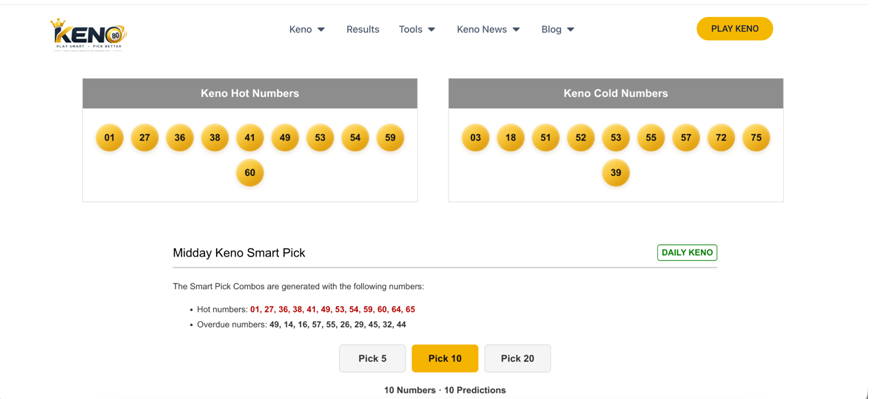
Figure 1. The Smart Pick page capture shows historical labels and Pick 5, Pick 10 and Pick 20 controls.
Read the historical labels in context
“Hot” usually describes numbers that appeared frequently in a chosen sample. “Cold” usually describes less frequent appearances; “overdue” generally describes a gap since the last appearance. These labels depend on the game, time window and counting method. If those settings are not shown, avoid assuming the lists come from the same sample or form a current ranking.
Check both the row size and the number range
The Pick 10 screenshot shows multiple rows, each containing ten values. The size control describes the examples displayed by the tool. It does not establish that the same number of picks is allowed for a particular lottery ticket.
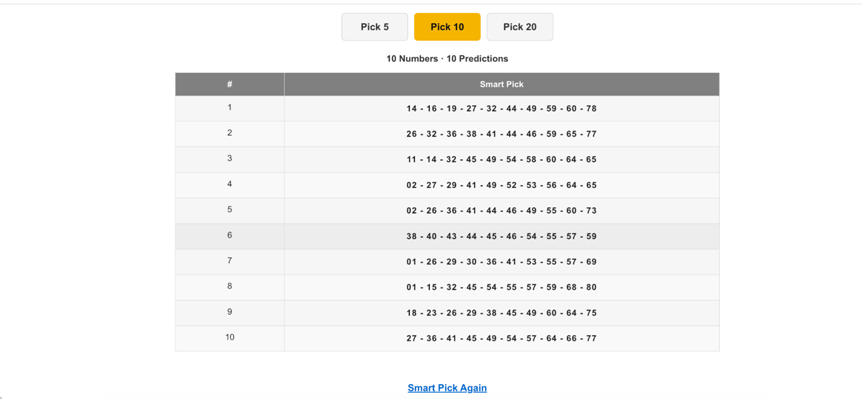
Figure 2. Captured Smart Pick output. The rows are example combinations, not official draw results or validated forecasts.
Ontario DAILY KENO illustrates why the distinction matters. Under the official OLG game conditions, Ontario selections contain two to ten numbers from 1 to 70. The Smart Pick capture includes a Pick 20 control and some example values above 70. A 20-number example or any row containing an out-of-range number cannot be used as an Ontario selection as shown.
Use the results page to verify a completed draw
To see which numbers appeared after a draw, consult the KenoSpeed results lookup. Confirm the game and draw identifier first. For a ticket claim or a discrepancy, use the official operator's result.
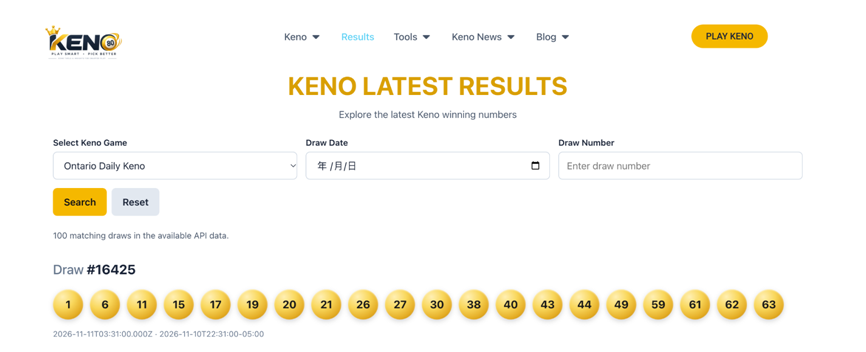
Figure 3. A results-page capture showing a game selection, draw identifier and drawn numbers, separate from generated Smart Pick output.
Use the labels as descriptions of the past
A number that appeared often in one historical sample has no extra chance of appearing in the next fair, independent draw. Likewise, a long absence does not make a number due. The word “predictions” in the interface is a display label; it is not evidence of an advantage. When comparing example sets, focus on the number count and eligibility. When checking a ticket, focus on the verified draw record.